

The 8171 web portal error fix guide has become extremely important in 2026 because thousands of families across Pakistan are facing problems while checking their eligibility and payment status online. Many users report that the portal is not opening, CNIC verification fails, or payment details do not appear properly. Most applicants become worried when they see messages like “Record Not Found,” “Verification Pending,” or server errors. In reality, many of these issues can be fixed easily if users follow the correct process. This guide explains the latest 8171 portal problems, their causes, and simple step-by-step solutions in easy language.
What is the 8171 Web Portal?
The 8171 web portal is an online verification system used by the Government of Pakistan to help citizens check eligibility, payment status, and registration details for programs like the Benazir Income Support Programme and Ehsaas Program.
The portal allows users to:
- Check BISP payments
- Verify CNIC status
- Confirm eligibility
- Track registration updates
- View survey verification results
The system is connected with:
- NADRA
- BISP
- Government of Pakistan databases
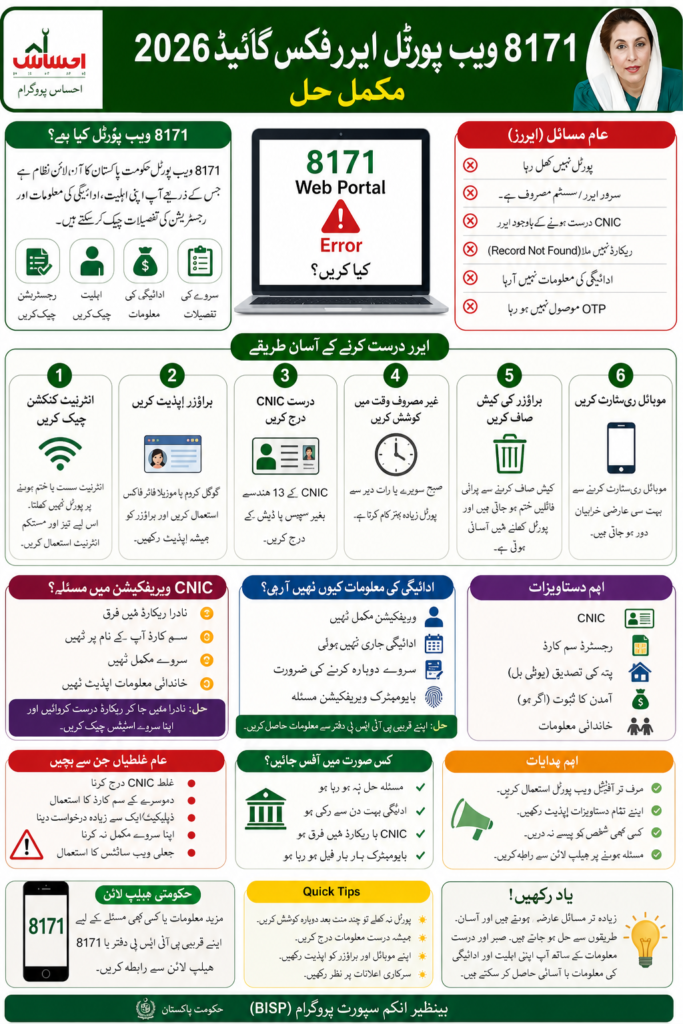
Latest 8171 Portal Update 2026
In 2026, the Government of Pakistan introduced several updates to improve the 8171 system. Due to increasing traffic, the portal sometimes becomes slow or temporarily unavailable.
Latest Changes Include:
- Faster CNIC verification system
- Improved mobile accessibility
- Better NADRA record integration
- Enhanced fraud detection
- Dynamic survey re-verification
Many users are currently facing delays because the updated system is processing millions of records simultaneously.
Read More Detail : Stay Updated with Every Govt Scheme & Relief Program
Common 8171 Web Portal Errors
Many applicants face similar issues while using the portal.
Common Problems Include:
- Portal not opening
- Server error
- Invalid CNIC message
- Verification pending
- Record not found
- Payment not showing
- OTP code issue
- Slow loading pages
- Session expired error
These problems usually happen due to technical issues, incomplete records, or heavy traffic on the system.
Why the 8171 Portal Stops Working
There are several reasons why the portal may stop working temporarily.
Major Causes
| Problem | Possible Reason |
| Portal not loading | Heavy traffic |
| CNIC rejected | NADRA mismatch |
| Payment missing | Verification incomplete |
| OTP not received | SIM not registered |
| Slow system | Server maintenance |
| Record not found | Survey incomplete |
Many people panic immediately, but most issues are temporary.
How to Fix 8171 Web Portal Errors
Step 1: Check Your Internet Connection : A weak internet connection often prevents the portal from loading properly.
Step 2: Refresh the Portal : Sometimes the system becomes overloaded. Refresh the page after a few minutes.
Step 3: Use Updated Browser
Use:
- Google Chrome
- Microsoft Edge
- Firefox
Old browsers may not support the portal correctly.
Step 4: Enter Correct CNIC
Always enter:
- 13-digit CNIC number
- No dashes
- No spaces
Step 5: Try During Non-Peak Hours : Late night or early morning usually works better because traffic is lower.
Read More Detail : Stay Updated with Every Govt Scheme & Relief Program
How to Fix 8171 CNIC Verification Problems
If your CNIC verification fails on the 8171 portal, update your NADRA information, ensure your SIM is registered in your own name, and complete any pending dynamic survey verification. Many applicants face CNIC issues because:
- Family records are outdated
- Marital status changed
- Income information incomplete
- Mobile number mismatch
Common NADRA Record Issues
NADRA verification is one of the biggest reasons for portal problems.
Most Common NADRA Problems
- Expired CNIC
- Incorrect family details
- Unverified fingerprints
- Wrong address information
- Unupdated marital status
If your data is incorrect, visit the nearest NADRA office immediately.
8171 Portal Not Working on Mobile?
Many users say the portal works on desktop but not on mobile devices.
- Clear browser cache
- Restart mobile phone
- Update browser app
- Disable VPN
- Use stable internet
Sometimes older phones struggle to load heavy government portals properly.
Payment Status Not Showing – What Does It Mean?
This is one of the most searched questions in Pakistan right now.
Possible Reasons:
- Verification still pending
- Payment not released yet
- Survey incomplete
- Biometric issue
- Eligibility under review
In many cases, users simply need to wait for the next payment cycle update.
Biometric Verification Problems
Biometric verification failures are common among elderly applicants and labor workers.
Common Causes
- Fingerprint mismatch
- Damaged fingerprints
- NADRA verification delay
- Poor biometric device quality
Solution
Visit the nearest BISP office and request biometric re-verification.
Important Documents Required
Before using the portal, keep these documents ready.
| Required Document | Purpose |
| Original CNIC | Identity verification |
| Registered SIM | OTP verification |
| Family details | Eligibility check |
| Utility bill | Address proof |
| Income details | Financial verification |
Many users fail verification because documents are incomplete.
Common Mistakes Applicants Make
- Entering wrong CNIC number
- Using someone else’s SIM
- Ignoring survey updates
- Believing fake messages
- Applying multiple times
These mistakes can delay approval or create temporary blocks.
Difference Between Temporary Error and Rejection
Many applicants confuse technical issues with rejection.
- Portal loading issue
- Server busy message
- Verification pending
- Payment processing delay
Rejection Signs
- Ineligible status
- PMT score too high
- Survey failed
- Fraud detection
Understanding the difference helps reduce unnecessary panic.
What To Do If Problem Continues
If your issue does not get resolved after several days:
Follow These Steps
- Visit nearest BISP office
- Complete dynamic survey
- Update NADRA record
- Verify SIM ownership
- Ask for complaint registration
Most unresolved cases are fixed after manual verification.
Government Helpline & Support
Applicants can also contact official support channels.
Available Support Options
- BISP Tehsil Offices
- Official 8171 portal
- Government helpline
- NADRA offices
Avoid fake agents asking for money. Official registration is usually free.
Read More Detail : Stay Updated with Every Govt Scheme & Relief Program
Expert Tips for Faster Approval
- Keep CNIC updated
- Use your own SIM card
- Complete survey carefully
- Avoid multiple applications
- Check portal weekly
- Save confirmation messages
Many users get approved faster after correcting minor mistakes.
Quick Summary of 8171 Web Portal Error Fix Guide
- Enter correct CNIC number
- Update NADRA records
- Use registered mobile SIM
- Complete dynamic survey
- Clear browser cache
- Visit BISP office if issue continues
Frequently Asked Questions :
How to fix 8171 web portal errors in 2026?
You can fix most 8171 portal errors by updating NADRA records, entering the correct CNIC, using your own SIM card, and refreshing the portal during low traffic hours.
Why is the 8171 portal not opening?
The portal may stop working because of server traffic, maintenance, slow internet, or browser compatibility issues.
Can I do 8171 CNIC verification online?
Yes, users can verify eligibility online through the official 8171 web portal using their CNIC number.
Why does the 8171 portal show records not found?
This usually happens when your dynamic survey is incomplete or NADRA records are not updated.
What should I do if my payment status is missing?
Wait for the next update cycle and ensure your verification process is completed properly.
Is biometric verification necessary for BISP?
In many cases, yes. Biometric verification helps confirm identity before payment release.
Can expired CNIC cause portal errors?
Yes, expired CNICs often create verification failures in the 8171 system.
How long does verification take?
The process may take several days or weeks depending on application volume and verification status.
Final Conclusion :
The 8171 web portal error fix guide is very important for families trying to receive financial support through BISP and Ehsaas programs in 2026. Most portal problems are temporary and can be solved by updating NADRA information, completing surveys, and using correct CNIC details.Many applicants lose valuable time because they panic after seeing portal errors. In reality, small corrections often solve the issue quickly. Users should avoid fake agents, keep documents updated, and follow official government instructions carefully.If the problem still continues, visiting the nearest BISP office is usually the best and fastest solution.